Picture the start of your workday. You don’t open five tabs to work out what needs attention. You just ask, “What should I focus on today?” and get a clear answer, with the right customer context already pulled together.
Now picture a second request: “Get me ready for my meeting with this customer.” No hunting through the CRM, old emails, open cases and opportunity notes. The preparation is done before you ask twice.
That is the direction Salesforce is heading with Agentforce Coworker, and it is getting real traction. In November 2026, Salesforce reported that Coworker usage had grown 21 times in three months, passing 185,000 users. It has also brought Coworker into Microsoft Teams and added mobile and desktop experiences, so people can reach it where they already work.
So what does this actually mean for a business? Is it a genuine digital employee, or clever branding? And where does an AI coworker sit next to your human team? Let’s work through it.
What Agentforce Coworker actually is
Agentforce Coworker is an AI teammate built to help employees get work done, not just answer questions.
A standard assistant can tell you the status of an opportunity. A coworker is meant to handle a request like: “Find out why this deal is stalling and put together a summary for my sales meeting.” That one sentence hides several steps: identifying the customer, reviewing the opportunity and its recent activity, spotting likely problems, and producing something you can use.
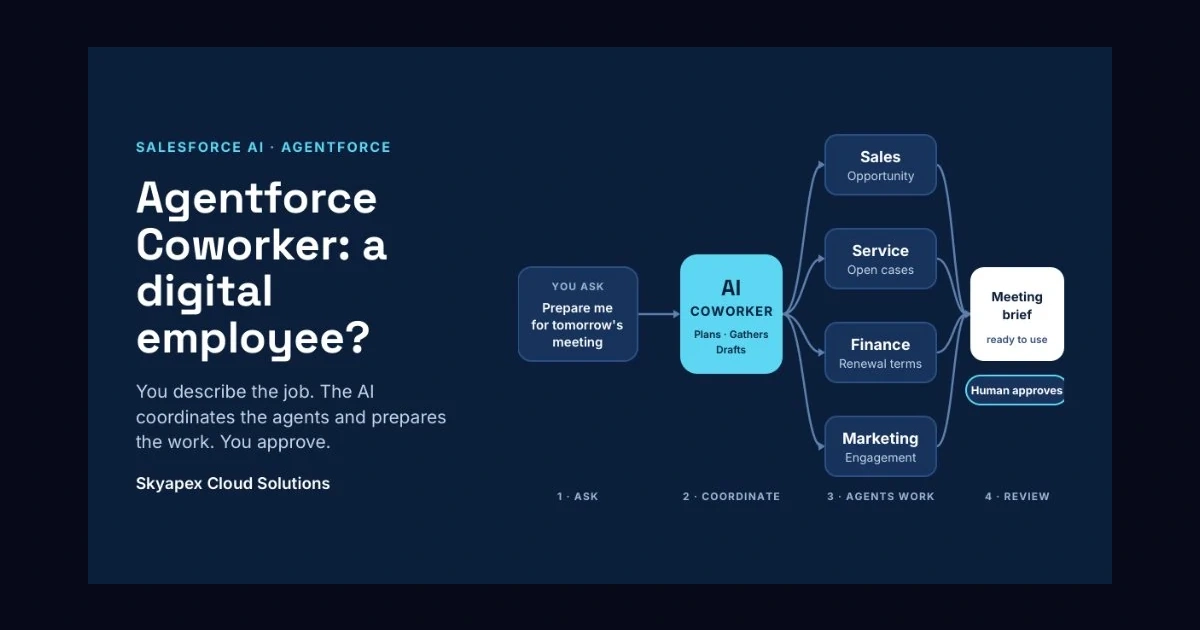
You don’t have to say which Salesforce page to open or which agent should do which part. You describe the job, and the AI works through it. According to Salesforce, Coworker acts as a coordination layer that calls on the right Agentforce agents and workflows, so employees aren’t left juggling them one by one.
Why the word “coworker” matters
For decades, software has been a tool. You open it, search it, decide, act, and the system records what you did.
Agentic AI changes that relationship. Compare three models:
- Traditional software: you open Salesforce, find the data, analyze it, and do the task.
- AI-assisted work: you ask the AI, it gathers context and drafts the work, and you review it.
- Agentic work: you state a goal, the AI decides the steps, uses the tools and agents it needs, and returns results or recommended actions. You approve where approval is required.
You are still in the loop, but the manual effort shrinks. That shift is why “digital employee” is a fair comparison.
More than a chatbot
The label “AI” now sits on nearly every product, so the differences are worth spelling out:
- A basic chatbot takes a question and returns an answer.
- A generative assistant adds context before it responds.
- An AI agent takes a goal, plans, uses tools, acts, and reports back.
Coworker adds one more layer: a single entry point to many Salesforce capabilities and specialized agents. A salesperson shouldn’t need to know whether a task belongs to a sales agent, a service workflow or a Flow. They describe the outcome, and the right pieces are coordinated behind the scenes.
A real example: preparing for a customer meeting
Say you’re an account executive with a big meeting tomorrow. Normally you’d dig through the account, current and past opportunities, recent activity, service cases, conversations, renewal dates and internal notes. Everything exists, but gathering it can easily eat 30 to 60 minutes.
Now you ask: “Prepare me for tomorrow’s meeting. Highlight recent activity, open issues and renewal risks.” The AI assembles the picture, and you spend your time on the part only you can do: deciding how to handle the conversation.
The AI isn’t replacing the salesperson. It is taking over the legwork.
Why Salesforce data gives it an edge
A general-purpose chatbot knows nothing about your customers, your cases, your permissions or your internal rules. Salesforce already holds much of that. Coworker can draw on Salesforce records, business metadata and supported connected data, including information available through Data 360.
A single customer might link to accounts, contacts, opportunities, cases, activities, orders, contracts and service history. When the AI can see that whole picture, it stops being a good writer and starts being useful, because it understands the actual business situation.
The catch: data quality
AI can’t repair messy data. If your CRM is full of duplicates, missing contacts, stale records or wrong opportunity stages, the AI can still sound completely sure of itself while being wrong. Confidence is not accuracy.
Before rolling anything out, ask yourself:
- Is our data accurate?
- Is the right information connected?
- Does the AI have access to what it truly needs?
- Are permissions set up correctly?
The cleaner the foundation, the better the results.
Working with specialized agents
Coworker doesn’t have to do everything itself. Salesforce has been building job-focused agents for sales, customer service, employee service, commerce, supply chain and inbound lead generation, along with Multi-Agent Orchestration, which lets agents collaborate when a process crosses roles or systems.
Take a customer renewal. Sales understands the opportunity, service checks unresolved cases, finance reviews commercial terms, marketing looks at recent engagement, and the AI brings it all together. The employee shouldn’t need to understand that machinery. They talk to one coworker, which is a very different experience from handing people ten separate AI tools.
AI Skills: turning your best habits into a shared process
Every company has people with their own winning routines. Your top salesperson might always review the account, check recent activity, scan open opportunities, read past conversations, look at unresolved cases, research competitors, prepare questions and write a brief. That process often lives only in one person’s head.
Salesforce says AI Skills let users describe a repeatable task in plain language, turn it into a reusable workflow, and share it with colleagues. Imagine a company with 500 reps where the top 20 have excellent research habits. Training and documentation help, but people still interpret them differently. With a Skill, a new hire can follow the same structured approach as a veteran.
This goes beyond automation. It is knowledge transfer, individual expertise made available to everyone.
Where it helps across teams
- Sales. Reps spend a surprising amount of their day on admin: researching accounts, updating records, writing notes and follow-ups, checking pipeline. You could ask, “Which of my highest-value opportunities have had no meaningful activity in 14 days?” or “Draft follow-ups for the customers I met yesterday.” The AI prepares, the rep reviews and sends. Judgment stays human.
- Customer service. When a customer has contacted you several times about one problem, an agent shouldn’t have to spend 20 minutes reading old cases. “Summarize this customer’s history and explain why the issue is still open” gets them to the real work faster. Customers don’t care how many systems you searched. They care that someone understands the problem.
- Marketing. A manager might ask which accounts engaged with a recent campaign but haven’t spoken to sales, then request a performance summary with suggested follow-ups. The AI does the gathering, the marketer makes the call.
- Internal teams. HR, IT and operations can use it for policy questions, onboarding checklists, request summaries and routine admin. It becomes one more way employees interact with business processes.
Coworker is leaving the Salesforce tab
People don’t live in a single application. A typical salesperson moves between Salesforce, Teams, email, calendar, documents, meetings and a phone. If AI only works in one of them, employees keep switching context.
Salesforce has extended Coworker into Microsoft Teams and added mobile and desktop experiences. It has also announced connections to Google Workspace and Microsoft 365, so email, calendar and file information can sit alongside Salesforce data. The better model is AI that comes to the employee, not the other way around.
Conversation history helps too. Start a renewal analysis in the morning, step out for a meeting, and pick it up later on another device without starting over. Salesforce says conversations carry across Salesforce, Teams and its newer apps. It sounds minor, but work doesn’t happen in neat ten-minute sessions.
From reactive to proactive
Most AI tools still wait for you to ask. The next step is recurring work that prepares itself: a morning list of accounts needing attention, a Monday pipeline summary, an evening check for cases stuck past their agreed threshold.
Salesforce says scheduled tasks and Daily Digest are part of the Coworker roadmap, with scheduled tasks expected in December 2026. The relationship flips from “employee asks, AI responds” to “business defines the work, AI prepares it, employee reviews.”
Will AI replace employees?
The question is usually framed too simply. AI can research accounts, summarize history, draft emails and update records. But sales still depends on trust, negotiation, relationships, understanding motives and reading the room. When an important customer is angry about a serious problem, a person should make the final call.
A more useful question is: which parts of each role should AI handle, and which should stay with people?
Oversight and governance
Giving AI access to enterprise systems comes with responsibility. A sensible way to think about it is in tiers:
- AI can act on its own: summarizing, researching records, preparing reports, spotting patterns, drafting communications.
- AI needs approval: sending important customer messages, updating key records, making commitments, changing business information.
- Humans must decide: sensitive financial calls, major contracts, high-impact customer actions, sensitive employee matters.
The exact lines depend on your business, but the rule holds: the more consequential the action, the tighter the control. Salesforce says Coworker operates within existing permissions, sharing rules and configured controls, and that supported actions can include approvals and audit trails.
Governance matters more here than with traditional automation, which follows a fixed path. AI is more flexible, and that flexibility brings new risk. You need to know what data it can reach, who can use it, which agents it can call, what actions it can take, which need sign-off, how activity is monitored, how errors are handled and how sensitive information is protected. This isn’t installing a chatbot. It is part of your technology architecture.
How to get started
Don’t begin with “Where can we add AI?” Begin with the problem.
- Find repetitive work that people do over and over.
- Map the real process, not the one in the documentation.
- Identify the data it needs, inside and outside Salesforce.
- Separate tasks from decisions, and decide what can be delegated.
- Define permissions so the AI only gets the access it needs.
- Start with one workflow, not the whole company.
- Measure the result in time saved, speed, productivity and customer outcomes.
- Expand gradually once the first workflow proves reliable.
Measure what matters
Headcount of users is a weak success metric. Better questions: How much time are we saving? Is work finishing faster? Are customers getting quicker responses? Are reps spending more time with customers? Are manual CRM updates falling? Are service issues resolving sooner? Is the process getting cheaper?
If meeting prep drops from 45 minutes to 10, that is a concrete gain. Multiply it across hundreds of employees and the business case builds itself.
A shift for Salesforce implementations
For years, implementations focused on how people use Salesforce: objects, fields, reports, dashboards, flows, security, integrations and interfaces. Now there is a second question: how will AI use Salesforce?
That raises the bar on data quality, clear processes, consistent terminology, well-built automation, permissions, integration design, AI actions, approval steps and monitoring. A messy org doesn’t improve when AI arrives. Often the AI just makes the existing problems easier to see.
The real prize: leverage
The biggest opportunity probably isn’t replacement. It’s leverage. A rep who can research ten accounts a day by hand might cover far more with AI handling the groundwork. A service agent who used to spend 15 minutes gathering context can spend that time helping the customer.
The employee doesn’t disappear. They get more done.
The workplace is likely to blend people with specialized AI systems: a coworker for the salesperson, a case-analysis agent for the service manager, a campaign monitor for marketing, agents coordinating routine operations, and an orchestration layer linking them when work crosses departments. Salesforce’s wider Agentforce strategy points exactly that way. Think less “humans versus AI” and more humans, AI agents and business systems working together.
An advantage for existing Salesforce customers
Existing customers aren’t starting from zero. They already have customer data, processes, security rules, workflows, history, integrations and metadata. Salesforce says Coworker builds on those records and operates within established permissions and governance.
That doesn’t make every company automatically ready. It means there is a foundation that can be extended into agentic workflows.
So, is the digital employee real?
The phrase can sound like marketing. But the idea is easy to understand: a digital employee doesn’t need a face, an office or a job title. It resembles an employee because it can take responsibility for a defined set of work. It receives a task, reaches the information required, follows a process, coordinates with other systems and agents, delivers an outcome, and, when configured well, knows when to hand off to a human.
Final thoughts
The question is changing from “Can AI answer my question?” to “Can AI help me finish my work?” For employees, that could mean less time searching, compiling and updating. For businesses, it could mean faster processes and more consistent execution of repeatable work.
But success depends on more than the technology. You need reliable data, clear processes, sensible permissions, strong governance and a firm view of where AI acts alone and where people stay in charge. The companies that benefit most won’t try to automate everything. They’ll pick the right work to delegate.
The goal isn’t to replace as many people as possible. It’s to give your people the right AI so they can spend their time on work that matters.
Ready to explore Agentforce?
Getting real value from Agentforce takes more than switching on a feature. You need to understand your Salesforce architecture, choose the right workflows, connect trustworthy data, set AI permissions and place human approval where it counts.
Skyapex Cloud Solutions helps businesses build and modernize their Salesforce environments, with consulting, implementation, Agentforce, AI integrations, CRM optimization, automation, MuleSoft and data-driven solutions.
If you’re considering Agentforce Coworker, skip “How can we use AI everywhere?” and ask instead: which business process would benefit most from an intelligent coworker beside our team? That is where a practical AI strategy starts.
Talk to Skyapex Cloud Solutions to see how Agentforce and AI can fit your Salesforce environment. Explore more at https://www.skyapexcloud.com/